Why you need to go to CodeMash

Posted on November 20th, 2009 in Uncategorized by Jon Kruger

This is your annual reminder that you need to go to CodeMash this coming January. I’ve gone the last two years and I look forward to it every year. In three days time you can get exposed to pretty much anything relating to software development, and as far as conferences go, it’s really cheap. So if you want to see why people are making such a big deal about Ruby, or you want to learn how to write iPhone apps, or if you want to learn how to do TDD, or just learn more about what you do at your day job, then CodeMash is for you!

Not only are there great sessions, there are open spaces going on throughout the whole conference. Open spaces are self-organizing discussions where you propose a topic that you want to talk about and put it on the board in a time slot. So not only will you have the great eyes-forward conference sessions, there are several open spaces in each time slot where you can go and talk with other people on whatever topics you can think up. Last year I spent almost the entire conference in the open spaces and I had a great time.

Every year people come from all over the country to come to CodeMash, and last year it sold out. It’s well on its way to selling out again, so go bug your boss as soon as you can and tell him or her that you need to go to CodeMash.

Oh, and I’ll be speaking at the PreCompiler (the first day of the event) on OOP, the SOLID principles, and other “clean code” tips! It’ll be an interactive session when we’ll do some coding and learn from each other, so it should be fun. I know I’m looking forward to it.

Hope to see you at CodeMash!


Kick It on DotNetKicks.com

Make your project pluggable with StructureMap

Posted on November 11th, 2009 in Design, StructureMap by Jon Kruger

UPDATE: This post has been updated to account for the StructureMap API changes that happened sometime around StructureMap 2.5.4.

We all know that StructureMap is great for implementing dependency injection in your application, making your app more testable, and all that. But StructureMap can do so much more than that. StructureMap can help you create pluggable project architectures that can allow you easily modify how your application works in certain situations with minimal to no configuration.
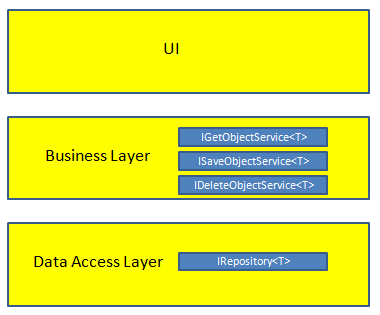
layersLet me explain. Most people have some kind of layered setup in their projects. The basic architecture is 3 tiers — a UI layer, a business layer, and a data access layer.

Entity objects are going to flow through these layers. You will load, save, and delete entities. And in most cases, the way that you load, save, and delete these entities will be the same — but not always the same.

What we want to do is write code to handle the normal entities and write it just once. If we need to modify how things are done for a certain entity, then we’ll write code for that. By doing it this way, we should have little or no code duplication.

The diagram on the right shows our project structure. You will notice that we have some generic interfaces defined in the business layer and data access layer. That classes that implement these interfaces will perform the specified actions using an entity (the generic parameter T in each interface).

Here’s an example. The IRepository<T> interface contains methods that will talk to the database. I will create a concrete class called Repository<T> that implements the standard method of talking to the database. This is how most of our entities will be loaded, saved, and deleted.

public interface IRepository<T> where T : class
{
    T Get(long id);
    IList<T> GetAll();
    void Save(T target);
    void Delete(T target);
}
 
public class Repository<T> : IRepository<T> where T : class
{
    public T Get(long id)
    {
        // do stuff here
    }
 
    public IList<T> GetAll()
    {
        // do stuff here
    }
 
    public void Save(T target)
    {
        // do stuff here
    }
 
    public void Delete(T target)
    {
        // do stuff here
    }
}

Let’s say that I have a Customer entity that is persisted to a different database than the rest of the application. I now have a special case where I need to write custom repository code for a Customer. So I’ll make a class called CustomerRepository and have it implement IRepository<Customer>.

public class CustomerRepository : IRepository<Customer>
{
    public Customer Get(long id)
    {
        // do custom stuff here
    }
 
    public IList<Customer> GetAll()
    {
        // do custom stuff here
    }
 
    public void Save(Customer target)
    {
        // do custom stuff here
    }
 
    public void Delete(Customer target)
    {
        // do custom stuff here
    }
}

Here’s where StructureMap comes in. I’m going to configure StructureMap so that I can ask for IRepository<T> for some entity T and it will give me back the correct concrete class. This means:

IRepository<Product> maps to Repository<Product>
IRepository<Order> maps to Repository<Order>
IRepository<WhateverOtherEntity> maps to Repository<WhateverOtherEntity>
IRepository<Customer> maps to CustomerRepository (because CustomerRepository implements IRepository<Customer>)

Look at how easy this is going to be! I’m not going to have to do any extra configuration or wiring up to change how Customer entities are persisted. I’m not going to write any extra plumbing code, I’m just going to create the CustomerRepository class and implement an interface, and now my app deals with Customer objects differently.

Obviously there is some fancy plumbing going on behind the scenes, so let’s see how we set this up.

It’s really not that hard, actually, because most of the hard work is done by StructureMap. We just have to do some simple configuration.

Here’s how we initialize StructureMap:

public class StandardStructureMapConfiguration
{
    public void Configure()
    {
        ObjectFactory.Initialize(x =>
        {
            x.Scan(scan =>
            {
                // Automatically maps interface IXyz to class Xyz
                scan.WithDefaultConventions();
                scan.ConnectImplementationsToTypesClosing(typeof(IRepository<>));
                scan.ConnectImplementationsToTypesClosing(typeof(IGetObjectService<>));
                scan.ConnectImplementationsToTypesClosing(typeof(ISaveObjectService<>));
                scan.ConnectImplementationsToTypesClosing(typeof(IDeleteObjectService<>));
 
                scan.Assembly(GetType().Assembly);
            });
 
            x.For(typeof(IRepository<>)).Use(typeof(Repository<>));
            x.For(typeof(IGetObjectService<>)).Use(typeof(GetObjectService<>));
            x.For(typeof(ISaveObjectService<>)).Use(typeof(SaveObjectService<>));
            x.For(typeof(IDeleteObjectService<>)).Use(typeof(DeleteObjectService<>));
        });
    }
}

Let’s break this down and go over what I’m doing here.

scan.WithDefaultConventions();

This tells StructureMap to automatically map an interface IXyz to class Xyz. Most of the time, the names of your interfaces are just the concrete class with an “I” slapped on the front. This only applies to non-generic classes, so this isn’t necessarily helping us with our IRepository<T> example, but I do it on every project, so I thought I’d throw it in.

scan.ConnectImplementationsToTypesClosing(typeof(IRepository<>));
scan.ConnectImplementationsToTypesClosing(typeof(IGetObjectService<>));
scan.ConnectImplementationsToTypesClosing(typeof(ISaveObjectService<>));
scan.ConnectImplementationsToTypesClosing(typeof(IDeleteObjectService<>));

We don’t just want to use the default conventions, we want to tell StructureMap to map concrete classes that implement generic interfaces. Basically all we’re doing here is telling StructureMap that if I have a custom concrete class that implements one of these generic interfaces, we want to automatically wire those up.

scan.AssemblyContainingType(GetType().Assembly);

We want StructureMap to look inside the specified assembly and apply the conventions to the types in this assembly. You can also do scan.AssemblyContainingType<T>.

x.For(typeof(IRepository<>)).Use(typeof(Repository<>));
x.For(typeof(IGetObjectService<>)).Use(typeof(GetObjectService<>));
x.For(typeof(ISaveObjectService<>)).Use(typeof(SaveObjectService<>));
x.For(typeof(IDeleteObjectService<>)).Use(typeof(DeleteObjectService<>));

Here we are wiring up the generic interfaces to the default concrete implementations of each interface. This is for the 95% of the time when we’re using the normal way of doing these things.

StructureMap needs to be initialized whenever your application starts (Program.cs for WinForms, App.xaml.cs for WPF, Global.asax Application_Start() for web apps). So in this case, I would new up an instance of the StandardStructureMapConfiguration class that I created here and call the Configure() method, which would do all of the ObjectFactory.Initialize() stuff.

I created a small sample project with this code. This is really easy to implement and it makes development a lot easier by reduces the amount of tedious plumbing code that you need to write.

Kick It on DotNetKicks.com

Save time by using IIS instead of Cassini

Posted on November 7th, 2009 in Uncategorized by Jon Kruger

I’m always looking for ways (whether or big or small) to make the software development process faster, and here’s a real easy win — use IIS instead of Cassini. Cassini was a good idea in concept (allows you to develop web applications without IIS), but it’s also really slow. If you’ve used it, you know what I’m talking about — every time you debug your application, you have to wait 20 seconds for Cassini to start up. Fortunately there is a better way, and that way is to use IIS instead.

The first thing is that you need to be developing a web application, not a web site. I can’t think of any reason to use a web site over a web application. So I’m going to assume that you already have a web application. I’m also using IIS 7. If you’re using IIS 6, you can still do all of the same things, but you have a different IIS console. But you should still be able to figure it out.

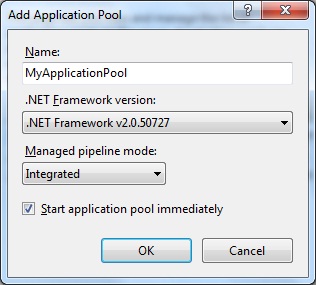
Step 1: Create a new application pool by right-clicking on “Application Pools” in the IIS management console. I suppose you could use an existing application pool, but I always like to make a new one. This way, you don’t have one application pool being used for multiple sites, because then you can’t change the application pool settings without affecting all of those sites. After you create the new application pool, click Start in the panel on the right to start the app pool.

Create a new application pool

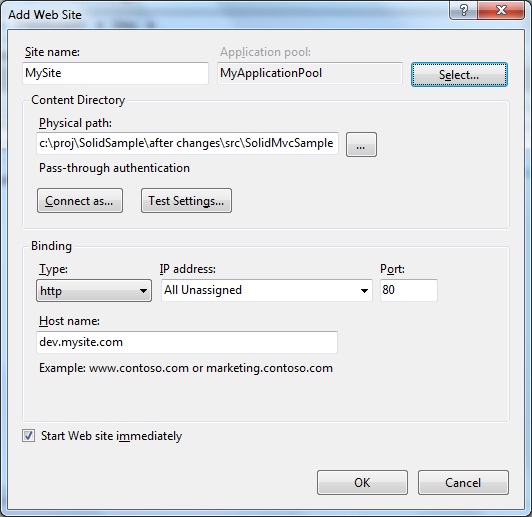
Step 2: Right click on “Sites” in the IIS management console and select Add New Site. The physical path should be the local path on your drive to the folder that contains the web.config file for your site. In the “Host name” text box, just make up some host name. For example, “dev.mysite.com”. It doesn’t matter what you pick, just pick a host name that doesn’t actually exist. Also, click the “Select” button at the top and select your application pool.

Add Web Site

Step 3: Edit your “hosts” file. This file can be found at C:\Windows\System32\drivers\etc\hosts. Enter this line at the bottom of the file:

127.0.0.1 dev.mysite.com

Use the host name that you entered when you created the new web site.

Step 4: Browse to the URL that you assigned to the site. In my case, http://dev.mysite.com. Your website should come up! Win!

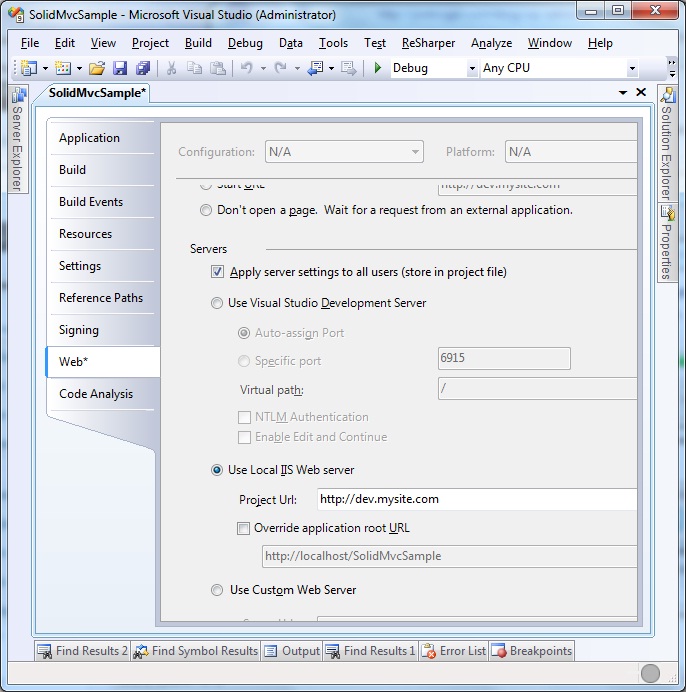
Debugging your site using IIS is slightly different. In Visual Studio, edit the project properties for your web site and select the Web tab. Click on the “Use Local IIS Web Server” radio button and enter your custom URL as the Project Url (e.g. http://dev.mysite.com). Notice that there is also a checkbox that says, “Apply server settings to all users”. Ideally everyone on your team will set up IIS (because this way is much faster), but if that is not the case, you will want to uncheck that checkbox.

Debugging

You can also debug your site by doing Tools / Attach to Process in Visual Studio (that’s Ctrl-Alt-P) and connecting to the w3wp.exe process (aspnet_wp.exe if you’re on Windows XP). If you don’t see w3wp.exe in the list, make sure that you check the “Show processes in all sessions” checkbox in the Attach to Process dialog box.

Happy debugging!


Kick It on DotNetKicks.com

Why I don’t put load/save/delete methods on entity objects

Posted on November 5th, 2009 in Design, OOP by Jon Kruger

Someone asked me the other day if putting Load(), Save(), and Delete() methods in entity objects is a bad thing. While I tried my best to explain why I don’t put these methods on entities, I thought it was worthy of a blog post.

I am a .NET developer, so I’m going to answer the question with how I would do it in .NET. If you’re working in a dynamic language like Ruby, things are certainly different and you don’t have all of the limitations that you have in .NET. So what I’m about to say really only applies to the static-typed languages (.NET, Java, C++, etc.).

First of all, I am writing unit tests, which means that I’m using concepts like dependency injection. Someone who doesn’t write unit tests or use dependency injection might not see value in structuring their code the way I structure it. But the arguments here only partially have to do with testability.

Let’s say that I have these entities in my application — Product, State, Country, Customer, Order. In this list I have some things that change often (Customer, Order) and some things that won’t change often (Product, State, Country). So let’s say that I decide that I’m going to cache the entities that don’t change often.

Let’s think of this in terms of loading, saving, and deleting. When I load them, I’m going to check the cache first. When I save them, I’m going to save the object to the cache as well as the database. When I delete them, I’m going to remove them from the cache. I’m going to change how these types of entities are loaded, saved, and deleted.

Now let’s imagine that my entities had methods like Load(), Save(), and Delete(). I would have to implement the special cached loading, saving, and deleting in three places - Product, State, and Country (and whatever other cacheable entities that I have). Any time you have to copy and paste code you should start to wonder if something is wrong.

In this case, I might deduce that the way to solve the duplication would be to split out the code that loads, saves, and deletes cacheable entities into some other class that is outside of the entity class. These classes would be powerful because they aren’t just acting an individual entity type, they are acting on certain kinds of entities. Maybe you specify that an entity is cacheable by having it implement and interface or maybe you decorate it with an attribute.

Now when you have another cacheable entity, all you have to do is implement the right interface or put an attribute on the entity class and it will automatically work with the cache!

This is a good example of the difference between object-oriented code and procedural code. We want to do more object-oriented programming and less procedural programming because object-oriented code is more testable, flexible, and reusable.

There are also testability reasons for not putting Load(), Save(), and Delete() on entity objects. If you don’t understand dependency injection, you should go read about it first so that this makes more sense.

When using dependency injection, you take in dependent classes through the constructor, but you don’t do this with entity objects because entity objects do not have dependencies. Entity objects define what the model is, and other classes (”domain services”) define how the entities work together.

Earlier in the post I talked about how I would create a class that knows how to save cacheable entities. If I had a Save() method on my entity class, I would need to call this other class (a dependency) from my entity’s Save() method. But remember, entities don’t take in dependencies, and I don’t want to new up the class that does the saving because now I can’t mock that class in a unit test.

You might be reading this and it might not make a whole lot of sense, but that’s OK. This is much different from how some people have written code for a long time, and they don’t teach you this type of stuff in school. But it’s always a good idea to question why things are done certain ways and maybe you’ll learn something new that can really help you out.


Kick It on DotNetKicks.com