When we work on software development projects, we break the project up into features. But what do you do when that feature is assigned to you?
Something that has helped me is to break the feature up into as many small tasks as possible. This helps me deliver working software incrementally and do it in an orderly fashion.
Let me put this another way. Let’s say that you want to make a meal for dinner, and you have to go to the grocery store to buy the ingredients. You could just go the store and try to remember what you need to buy. I’ve done this before. I need to get 5 things, and I’m constantly repeating over and over in my head what I need to buy. It’s mentally tiring! Instead, I’ve learned to make a list of things that I need to buy, and I bring a pen along so that I can cross things off after I’ve put them in my cart.
The same idea applies to software development, and there are many benefits.
Figuring out everything that needs to be done
Before I start working on a feature, I stop and think about everything I’m going to do to complete the feature. I try and break this down into the smallest unit of work that produces some working functionality. So I’m not writing down things like “Put Save button on screen”, I’m doing stuff like “Save a new order”. Now that I have this list, I can work through it in an orderly fashion, and after several days when I’m starting to get tired of the feature, I don’t run the risk of not thinking of everything I need to do to complete the feature just because my brain is tired, bored, or frustrated.
Knowing where to look when you break something
If you add two lines of code and something breaks, I think you know where to look! If you spend a day writing code and then realize that something is broken, it’s a lot harder to figure out what you did to break something.
Focusing on one thing at a time
In my grocery store example, trying to remember my list while shopping was difficult because mentally I was trying to do several things at once. If you are working on a single task like “save a new order”, you’re not thinking about loading orders or saving existing orders, you only have to think about one task. Mentally, this is much easier to do (and less stressful).
Knowing how far along you are
It’s fairly easy to get a rough estimate of how far along you are on a feature by looking at your list of tasks and seeing how many you have completed.
Feeling good
It feels good to cross things off on a list. At the end of the day, you can look back and see everything that you got accomplished. You may have not completed the entire feature, but you can have the good feeling that comes with crossing things off. I’ve seen people get quite flustered after several days on the same feature because they don’t feel like they’ve accomplished anything.
How I do this
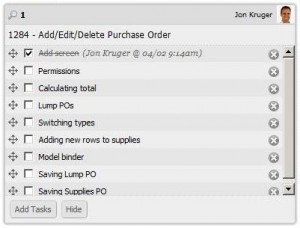 You can use an online tool, a text file, pen and paper, or whatever else you like to keep track of tasks. I use Agile Zen to keep track of my tasks on a feature (Agile Zen can also keep track of your features in an online Kanban board). I used to use pen and paper, but my desk started getting cluttered with papers. Do whatever works best for you.
It also helps to have a source control system that helps you out. I like doing branch-per-feature, where you create a branch in your source control system for each feature that you work on, and then you merge that branch back into the main development branch once you complete the feature. In this case, you’re the only one working on your branch, so checking in is easier because you don’t have to do the usual check in dance. Now you can check in as often as you like with very little effort, and if you set up your CI server with a build that points to your branch, it will run the tests for you every time. This way, if you go down the wrong path with your feature or realize that you broke something at some point, you will have lots of checkpoints to roll back to.
In order to do branch-per-feature, you will need a source control system that makes branching easy. The one that I recommend (which I use) is Git. If you’ve heard about Git and haven’t learned how to use it yet, go watch this video. Mercurial is another one that is similar to Git. I’ve done branch-per-feature with Subversion, but every time you create a branch or check in, it has to make calls to the server, which means that it’s slower. Git and Mercurial do everything locally on your machine (so it’s fast), and then you push your commits and branches up to the server when you decide to.
If you’re stuck using a source control system that doesn’t make branch-per-feature easy, you can use Git locally for feature branches and then just check into your team’s source control when you complete a feature. I’m doing this on my current project and it’s not that hard to set up.
Regardless of how you do it, I think breaking features up into small tasks will reduce your stress level and make it easier to develop working software incrementally. Give it a try and see what you think!