Recently I had the privilege of hearing Uncle Bob Martin talk at the Columbus Ruby Brigade. Among the many nuggets of wisdom that I learned that night, my favorite part was the Automated Testing Triangle. I don’t know if Uncle Bob made this up or if he got it from somewhere else, but it goes something like this.
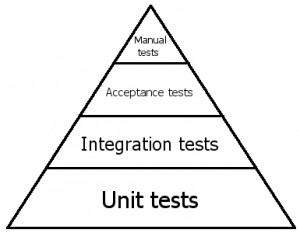 At the bottom of the triangle we have unit tests. These tests are testing code, individual methods in classes, really small pieces of functionality. We mock out dependencies in these tests so that we can test individual methods in isolation. These tests are written using testing frameworks like NUnit and use mocking frameworks like Rhino Mocks. Writing these kinds of tests will help us prove that our code is working and it will help us design our code. They will ensure that we only write enough code to make our tests pass. Unit tests are the foundation of a maintainable codebase.
But there will be situations where unit tests don’t do enough for us because we will need to test multiple parts of the system working together. This means that we need to write integration tests — tests that test the integration between different parts of the system. The most common type of integration test is a test that interacts with the database. These tests tend to be slower and are more brittle, but they serve a purpose by testing things that we can’t test with unit tests.
Everything we’ve discussed so far will test technical behavior, but doesn’t necessarily test functional business specifications. At some point we might want to write tests that read like our technical specs so that we can show that our code is doing what the business wants it to do. This is when we write acceptance tests. These tests are written using tools like Cucumber, Fitnesse, StoryTeller, and NBehave. These tests are usually written in plain text sentences that a business analyst could write, like this:
As a user
When I enter a valid username and password and click Submit
Then I should be logged in
At this point, we’re are no longer just testing technical aspects of our system, we are testing that our system meets the functional specifications provided by the business.
By now we should be able to prove that our individual pieces of code are working, that everything works together, and that it does what the business wants it to do — and all of it is automated. Now comes the manual testing. This is for all of the random stuff — checking to make sure that the page looks right, that fancy AJAX stuff works, that the app is fast enough. This is where you try to break the app, hack it, put weird values in, etc.
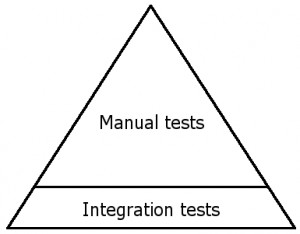 I find that the testing triangle on most projects tends to look more like this triangle. There are some automated integration tests, but these tests don’t use mocking frameworks to isolate dependencies, so they are slow and brittle, which makes them less valuable. An enormous amount of manpower is spent on manual testing.
Lots of projects are run this way, and many of them are successful. So what’s the big deal? Becuase what really matters is the total cost of ownership of an application over the entire lifetime of the application. Most applications need to be changed quite often, so there is much value in doing things that will allow the application be changed easily and quickly.
Many people get hung up on things like, “I don’t have time to write tests!” This is a short term view of things. Sometimes we have deadlines that cannot be moved, so I’m not denying this reality. But realize that you are making a short term decision that will have long term effects.
If you’ve ever worked on a project that had loads of manual testing, then you can at least imagine how nice it would be to have automated tests that would test a majority of your application by clicking a button. You could deploy to production quite often because regression testing would take drastically less time.
I’m still trying to figure out how to achieve this goal. I totally buy into Uncle Bob’s testing triangle, but it requires a big shift in the way we staff teams. For example, it would really help if QA people knew how to use automated testing tools (which may require basic coding skills). Or maybe we have developers writing more automated tests (beyond the unit tests that they usually write). Either way, the benefits of automated testing are tremendous and will save loads of time and money over the life of an application.