The three amigos

Posted on January 4th, 2012 in Agile by Jon Kruger

Part of being a developer is taking requirements that are written by business analysts and understanding the business problem and the requirements enough to develop a working software solution to solve the problem. In most environments, BAs will work with the developers to help them understand the feature. Once the developers are done, the QA team has to try to understand all of the requirements that the BAs and developers already covered extensively.

You can run into multiple problems here. First, many business analysts write requirements in a format that are not detailed enough to outline all of the edge cases. This is not a knock on business analysts, but they often think in terms of use cases and how the business will use the functionality. But this is why we have a team. Business analysts are better at thinking about the needs of the business and how the app will solve business problems. Developers and testers are good at thinking about the details but sometimes don’t always see the big picture.

This is why it’s so important to bring all of the team members together so that we can take advantage of all of our strengths. We do this in a meeting we call the “three amigos”.

How It Works

A three amigos meeting consists of a business analyst, a QA tester, and a developer. If it’s a larger feature that might involve more than one developer or more than one tester, then you might have more people in the meeting. The BA has written up all of the requirements beforehand, and ideally everyone in the meeting will have read through them before the meeting so that people can have a basic understanding of the feature and can come with their questions.

Once we all have a basic understanding of what we need to develop, we read through the requirements together and someone starts writing all of the test scenarios on a whiteboard. We’re not writing out the complete test plans, we’re just covering the scenarios that need to be tested and maybe some of the things that each scenario will check for. The primary goal is here to figure out what needs to be tested and how we’re going to test each scenario (unit tests, acceptance tests, or manual tests).

Outcomes

The primary outcome of the three amigos are acceptance tests written in Given/When/Then format. Actually writing these out can take a little time, so we don’t do that with everyone sitting in a room. Typically a developer or a tester will work on it outside of the meeting, and once they have the scenarios all written out, then we do a quick review with everyone else that was involved in the original three amigos meeting to make sure that we all agree with what was produced.

Benefits

When you get everyone involved up front, you spread the understanding of what’s being developed across multiple team members. On most teams, BAs and developers have a good understanding of what’s being built, but QA people are left in the dark until you’re most of the way through the process. This way, QA people know what’s going on and they can add their valuable input before a line of code is written. As a developer, this will also help you because the QA people helped you agree on the acceptance criteria that you’ll need in order to complete the feature. No more guessing about what QA is going to test or whether you’ve built everything that needs to be built.

Automating acceptance tests becomes much easier when QA people have helped you come up with the tests and have agreed on them. This is also a good chance to talk to the QA team about what you’re going to automate so that they know that they don’t have to spend as much time manually testing scenarios that the developers have fully automated. Remember, we’re all on the same team, and we’re all responsible for quality. It shouldn’t matter who is testing something as long as it gets tested.

In the end, you end up with fewer bugs because developers know what they need to build and they have everything they need to build it with no coding errors. Certainly this works much better if you’re writing automated unit tests and acceptance tests, but even if you aren’t, at least you will know what you need to build and what it needs to be able to do in order to pass all of the QA tests.

Exceptions

As with everything in software development, it helps to use common sense. We typically don’t do three amigos meetings for really simple features. There’s no hard and fast rule about this, so you have to use your head. If it doesn’t make sense to have a meeting with a bunch of people to review something that you can handle with simple hallway conversations, then go with that.

We don’t always do three amigos on bugs either. If it’s a coding error, there isn’t much to discuss, it just doesn’t work correctly. If we missed something in the requirements, it might require a bigger discussion about the new requirement.

I think that it’s dangerous to make blanket policies that say that you must have a meeting or a certain amount of documentation before you start development on something. The goal is to develop working software that meets the needs of the business with a sufficient level of testing and documentation. You have to decide what that is and how you get there.

Just another run of the mill Wednesday

Posted on January 3rd, 2012 in Agile by Jon Kruger

On my current project, we release every 2 weeks. We do the push to production on Saturday, so we set a deadline of Wednesday night for everything to be developed and tested so that we can have two days for demos and UAT.

I remember a certain Wednesday a couple of months ago where things were chaotic to say the least. We looked at the board on Wednesday in the early afternoon and there were 20 items where testing was not complete. We were running around trying to make sure that everything got tested. The entire development team was helping out with testing. Many people stayed past dinnertime to get everything done.

This past Wednesday was much different. Everyone was very relaxed. There was only one item on the board that was still being tested. We were all working on getting stuff ready for the next iteration. And oh by the way, one of the QA testers was out on vacation and another one had been moved to another project.

I immediately thought back to that chaotic Wednesday a few months ago and thought about everything that has happened since then. We certainly had come a long way to get to the point where things were much more relaxed. So what happened?

The Three Amigos

Before development can start on a feature, we have a “three amigos” meeting where developers, business analysts, and QA people get together and decide on the acceptance criteria for the feature. This helps us all get on the same page and make sure that we know what we’re building. It also gets the QA team involved very early in the process, so when it comes time for them to manually test the feature, they already know it inside out.

Automating acceptance tests

The outcome of the three amigos meeting is acceptance criteria. Developers take these and automate them whenever possible (we use a combination of unit tests and acceptance tests using SpecFlow). The development workflow now looks something like this:

  • Work with the QA team to write out the acceptance tests in SpecFlow
  • Develop all of the components needed to make the feature work, writing unit tests along the way
  • Try and get the acceptance tests to pass, fixing any problems we find along the way

When I’m working on the “try and get the acceptance tests to pass” phase, I’m going to find pretty much all of the coding errors that we made during development. The development ticket is still marked as “In Development” at this point, which is very important. We all take quality seriously, both QA testers and developers. I’m not going to hand it over to be tested by the QA team until I can get all of the acceptance tests to pass.

Almost no bugs

Because we knew what we were building up front and because we automated pretty much all of the testing, the QA team is finding very few bugs in the new features that we’re developing. One of our testers brought this up in our retrospective this past week and mentioned how they got everything tested so much faster because they weren’t finding bugs, writing up bugs, waiting for bugs to be fixed, and retesting bug fixes.

We had looked at the schedule earlier in the week and we had thought that developers might have to help out with testing because one of the testers was on vacation and they had some items to test that we thought would take a long time. In the end, no developers had to help with testing and testing got done ahead of schedule!

Everyone talks about how bugs are a waste of time, how they slow you down, etc., but it was really cool to see it play out. Yeah, getting those acceptance tests to pass takes a little extra time, but now I can hand a completed feature over to QA and have a good chance of not having any bugs. We had two developers working for a week on the feature that we completed, and we did it with no bugs. Not only that, we have automated acceptance tests that will do our regression testing for us.

Recap

A lot of the changes that we’ve made seem to be relatively minor, but they’ve produced huge dividends. Much of it comes down to discipline, not cutting corners, communicating effectively, and taking pride in your work. I’m really excited about what we’re going to be able to do from here and I expect to have even more stories to tell in the near future.

Maybe this is why developers don’t care much about testing

Posted on November 22nd, 2011 in Agile, QA by Jon Kruger

I’m a huge fan of TDD, and one thing that is really frustrating is when I’m working with people who either don’t know how to write unit tests or don’t agree with the idea of writing unit tests. This is especially true in a static language because those people will design the code in a way that prevents me from writing tests.

Why is it that so many developers don’t care about testing? Most developers that I’ve worked with, whether I agree with their ideas or not, take pride in their work and generally care about their job.

I think that this goes back to the traditional divide between development teams and QA teams. On most teams, there is always pressure to get things done faster. In order to get things done faster, you have to either cut something out or get better at what you do. It’s much easier to cut something out, so inevitably the team will do what they can to cut development time. This means cutting out unit testing (or not taking the time to do it in the first place). Once you cut out unit testing, the next thing you throw out is good design principles and just get it done as fast as possible.

We all know that if you don’t write unit tests and you just throw in spaghetti code to get something done that you’re going to have a lot more bugs. It takes time for QA people to find bugs, reproduce bugs, write up bugs, and retest bugs. But why should the development team care? They were just told to go faster. Who cares how long it takes the QA team to test the application? Why does the development team care if it takes an inordinate amount of time to regression test the application?

The QA team knows what is going on, so they don’t trust the developers. They know that the developers are likely to write bugs, so they will need to be more thorough. The problem is that sometimes this means doing an inordinate amount of manual testing (which may or may not be possible).

This is what happens when development and QA are separate teams that don’t work closely together. Each one is only looking out for their own interests, not the interest of the project as a whole. In my opinion, it makes no sense to do it this way, but this how it’s done in many companies.

On my current project, we have broken down the walls. The QA team and the development team report to the same manager. The developers, BAs, and QAs sit together in the same area. Before we work on a feature, we all sit down together and decide what will be tested with unit tests, what will be tested with automated acceptance tests, and what will be manually tested. Because we’re all on the same team, I (as a developer) care about testing just as much as anyone else on the team. There’s no reason for me to not care about testing. Don’t I want the app to work too? If I write crappy code, it’s going to take longer for the team to get things done. If I don’t help automate regression testing, it’s going to take the team longer to manually test everything. I don’t want either of these, so I’m going to help out. The QA team is starting to realize that they can trust our automated tests (which they’re not used to), and we all agree that in the future they will do much less manual testing.

Because we’re on the same team, we’ve enabled developers to care about testing. If we want to get things done faster, I want to make sure that I automate as many tests as possible so that QA doesn’t have to manually test them. I might even pitch in to help with manual testing when that time comes. In the end, we end up with high quality software delivered in less time because we have very few bugs and we will test things in the most efficient way possible.

Removing the divide between developers and QA

Posted on November 21st, 2011 in Agile, QA by Jon Kruger

In most companies, there is a definite divide between the development team and the QA team. They don’t sit together in the same area, they don’t have the same boss, and they often aren’t even working on the same project at the same time. Sometimes the QA team doesn’t get involved until it’s time for the “testing phase.”

To me, this all makes no sense. I’ve been on teams like this, and the same thing usually happens — developers develop something, and when the QA team starts to look at it, they don’t know the first thing about the feature that was built. They try to come up with a test plan, but they don’t come up with all of the edge cases because they don’t know enough about the feature. Other times they come up with something that the developers hadn’t thought of, or they find bugs because the developers didn’t do anything to test their own code (even manually).

Before we go any farther we have to dispel two common misconceptions about the role of a QA team.

Some people think that your QA team is like a college professor giving you an exam. You learn about a feature from the BAs or the users, and then the QA team is there to verify that you understand everything after you’ve written the code. The QA team shouldn’t give you their test plans because then you might just write the code to make their test plans pass (heaven forbid!). That’s like your professor giving you the answers to the test, and that’s cheating. (I’m being sarcastic, of course.)

Other people think of the QA team like a group of external auditors. You don’t know when they’re testing or what they’re testing. They’re just here to catch you screwing up. They have to be extremely thorough and cover all the bases to make sure that nothing gets through, regardless of whether the development team has written any automated tests.

I would much rather work together with QA people. I would rather come up with the test plans together so that we can make sure that I automate most of their tests for them and build the right thing. I would rather have QA people involved up front so that they can help me think about how something should be tested. They also are very good are finding holes in requirements that no one else though of, which is very valuable to have up front before we right any code.

The hard part in all of this is getting people to work together who typically don’t work together. Usually developers and QA have different managers, and developers and QA people might not even be working on the same projects at the same time. You might need to get your management to work together to get people on the same teams working on the same projects at the same time.

We’ve been doing all of this on our current project and we’re really starting to see some exciting things. Much more on this to come!

Know what you’re building

Posted on October 24th, 2011 in Agile by Jon Kruger

If you set out to build something, you need to know what it is that you need to build. That’s just common sense, right?

Unfortunately a lot of companies struggle with this. It usually starts with requirements that don’t have the level of detail that they need in order to cover all of the edge cases. That leads to developers getting frustrated, guessing at the requirements, and low morale, among other things. In my opinion, this is not that difficult of a problem to solve. Here are some steps that might help:

Define the scenarios

As a developer, don’t start working on a feature until you can specify all of the testing scenarios in the Given/When/Then format.

Given I am a logged in user
When I go to the new order screen
And I try and purchase an iPhone
Then I should see a message saying that I’m eligible to buy a phone at the promotional price
And I should see a date when the phone is expected to ship

There are multiple reasons to do this. First, someone is going to have to test the feature at some point. You might as well define all of the test cases before you write the code. Otherwise you will have to guess what it is that you’re supposed to build since the QA team is going to define what “done” means. Figure out what “done” means ahead of time, and then you should have all the information you need to build the functionality with no bugs. Not only that, the QA team will be able to complete testing on your item in very little time (they’ve already written the test cases, and they won’t find a lot of bugs).

Second, do it for your own benefit. If you have Given/When/Then scenarios written out, you can easily turn that into unit tests. You can easily break the work down into smaller tasks. It also forces you to think about edge cases, design, and testing at the beginning. Now you have a good idea of what steps you need to take to build the functionality, it will be easier to write tests for everything, and you’ll know when you’re done (and how close you are to being done). You won’t get to the end and say, “I hope I thought of everything.” Sure, you might still miss something, but you’ll be a lot more confident that you didn’t.

It’s amazing how much longer it takes to develop something when you don’t have things broken down like this. It’s like you have to keep track of more things in your head, so you don’t think as fast. It’s much easier to take Given/When/Then scenarios and make them work one at a time.

Take time to design

A common misconception about Agile methodologies is that Agile does not place any importance on planning. Most Agile methodologies don’t approve of documentation for documentation’s sake. People therefore associate “design document” with “ZOMG WATERFALL RUN FOR YOUR LIVES!!!”. On my last project, my team lead had me write a design document for a feature I was going to work on and then we were going to discuss it together. The purpose of the document was not to check off a box or fill up a binder with stale technical details, the purpose was to help me think about the design. I was amazed, as I wrote everything out, I thought of all kinds of things that I hadn’t thought of before. It was an extremely valuable experience.

Agile says that we aren’t going to do big design up front, but that by no means implies that we should start working on a feature without having it defined! You may not have all of the details about what you’re going to build next week, but you definitely have to define what it is that you’re building right now. Agile does not encourage spotty requirements, in fact, it’s just the opposite. We want to have the requirements defined so that we can all agree on what the business needs and then write code with automated tests and no defects. Planning and design are not optional.

Hold your ground

If you have bad requirements, I think the buck needs to stop with the developers. The fact is that you can’t build something if you don’t know what it is that you need to build. If you know 90% of what you need to build, you can build 90% of it, but you can’t complete the feature. When this happens, you start getting a lot of bugs because no one (yourself included) thought of everything that needed to be considered.

So next time you have requirements that aren’t complete, don’t just start developing. Work with the BAs, QAs, business people, or whoever else needs to be involved to get everything defined. Once you start working on it and they see work getting done, people will assume that everything is OK when it’s not really OK. If you focus on getting all of the questions answered first, people might be more focused on getting everything defined because they’ll know that you’re blocked.

Sometimes you might have enough of the requirements that you can start developing. This is fine if you only have minor questions unanswered (”What should this error message say?”). You just don’t want to get in a situation where you’re getting stuck, you’re having to guess, or you’re having requirements changed on you because people are still thinking about the design.

Use your card wall

If you have swim lanes on your card wall, create columns for “In Analysis” and “Ready for Development” (or some similar wording). Don’t put anything in “Ready for Development” until the requirements are complete. Do the same thing in your work item tracker. We want people to be aware that there are still things to be done to define the requirements. If BAs see that, they will want to do what they need to do to get the feature out of that status and into “Ready for Development”. It also gives developers a visible way to say, “No, I need more definition before I can start developing.”

Use some tact

Please, please don’t go blasting your BAs, users, product owners, and everyone else who is not a developer. These people are trying their best (usually), but as a developer you have a different perspective on things. Your perspective is important, but so is theirs. Quit treating your users like “stupid users” and try to understand where they’re coming from, and help them understand where you’re coming from.

I’ve written plenty of requirements and it doesn’t feel good when a developer mocks the requirements that I just spent the last two days defining. Sure, I missed stuff. But no one appreciates getting put down when they’re working hard. Work with them to fix the problem, but use plenty of tact.

Be a coach

Writing code might be your primary job function, but you can also be unofficial coaches and help the rest of your team define good requirements in a way that will enable you to succeed. It’s in everyone’s best interest (yours included) if you try to collaborate more with people on your team. We like things in Given/When/Then format because we can easily write code against deterministic scenarios like this. It’s good for us if we have the test cases defined up front because it helps us know what to build. So if we can teach BAs how to write requirements this way and we can teach QAs to work with us to help define test cases before we write code, then everyone will win.

Implied metrics

Posted on September 14th, 2011 in Agile by Jon Kruger

In my last post, I talked about the kinds of metrics that I don’t like. But sometimes even good metrics can go wrong.

When I worked for a previous employer, we used “load sheets” on our Agile card wall. These were pieces of paper divided into 10 blocks (10 days in a 2 week iteration) and then we would cut out cards for the features that were sized to take up as many blocks as the estimate (so a 3 day estimate card would take up 3 blocks). We would use different colored dot stickers to indicate when we had discussed the requirements, discussed the design, completed the development, and when QA was complete. Each developer on the team would have one of these sheets on the wall, so you could see who was working on what and where we were pretty easily.


Load Sheets

I didn’t come up with the system, but I’m guessing that they designed it for at least two reasons (probably more than that):

  • Anyone can come and see what we’re working on and what the status is of a particular feature
  • We would meet with the project sponsor every other week and they would pick out features for the next two weeks, and the differently-sized cards gave a good visual representation of the cost associated with each feature

This system did an excellent job of both of those things. The problem is that the development team interpreted it in a completely different way.

When the developers looked at the sheets, these are some of the things that they thought:

  • The most important thing is for me to get my features to QA in the estimated time
  • Completing my tasks in the estimated time is important (more important than things like writing tests or helping other developers, because there are no metrics for those)
  • Completing my tasks this iteration is more important than helping others complete their tasks (even if helping someone else would be better for the team). This indirectly discouraged pairing on tasks.

As a result, the following things actually happened (I’m not making this stuff up):

  • One developer segregated himself from the team and focused on completing as many features as he possibly could. He did a good job of staying focused and he did get a lot done, but there was little collaboration or design discussion and virtually no unit tests. He used his productivity metric to ask for a raise (because he was completing twice as much work).
  • Developers would work on features, and as soon as the estimated time passed and they weren’t done, they got openly flustered and complained about the estimates being wrong (which was correct), and focused on getting it done instead of getting it done right (which led to technical debt).
  • Developers would get the work most of the way done and then say it was done, saying, “It’s far enough along that QA can take a look at it and let me know what’s wrong.” (That way they could move on to the next task.)

Whoa, what happened?!? I’m sure this wasn’t what the people who came up with this system intended. But that’s the problem — while the system provided a lot of positive benefits, it also indirectly encouraged individualistic behavior and cutting corners and discouraged collaboration because of implied metrics. I was leading the team, and I wasn’t going into TFS and spitting out reports to compare developers, and I wasn’t tracking who was completing tasks within the estimated time, because it didn’t matter at all. It didn’t matter what I was or wasn’t doing — the data was being tracked, so developers assumed that something was (or could) be done with it. (I’m not using this example to criticize the people who came up with the system, because no system is perfect, and there were many very successful projects completed using this approach.)

What could we have done differently? We could figure out what message we want our card wall to convey to the developers and structure it that way. For example:

  • I care much more about how much the team accomplishes in an iteration than how much each individual developer gets done, so don’t organize the cards by team member (if you want to write developers’ names on cards, that’s fine, just don’t organize them in a way that it’s easy to compare developers).
  • I care much more about a feature being done and ready to be deployed than I care about when a developer hands it over to QA, so instead of measuring how long it takes developers to complete their first pass at development, I’ll measure how long it takes from the time we start working on a feature to the time that it’s ready to be deployed. We need to break down the traditional silos of development and have BAs, QAs, and developers work together to achieve one goal.
  • I value communication and collaboration, so when I’m talking to the team, I’ll emphasize working together, being willing to help each other out, pairing, and things like that. I don’t want developers to think that they should be smart enough to figure something out when they’re stuck, I want them to ask for help and I want people to solve each other’s problems.

Metrics, and why I usually dislike them

Posted on September 6th, 2011 in Agile by Jon Kruger

Every team, company, and IT department wants to collect metrics these days. Sometimes metrics can be used for good purposes (e.g. are we on schedule), and some can be used for bad (e.g. let’s come up with some way that we can attempt to quantify how good our teams are so that we can compare them).

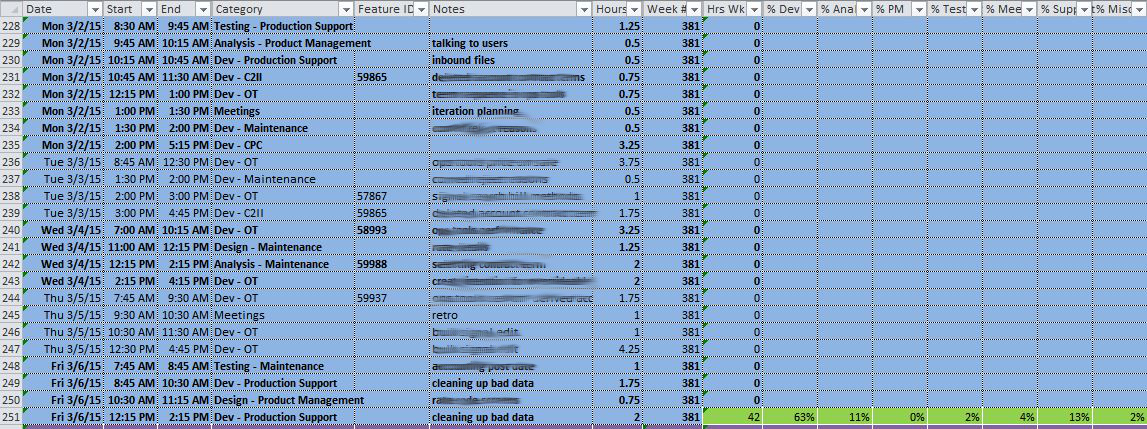
Let’s just get this out of the way — I really dislike metrics when they are used incorrectly. I think metrics are a good way of measuring your own progress internally. For example, I want to know if I’m on schedule to meet a target date. If the team is estimating work, I want to know how the actual time spent on the features compares to the estimates so that we can get better at estimating. I want to know how much time team members are spending on different activities (e.g. requirements gathering, development, production support) so that I can make future plans and staff the team accordingly. I might want to measure cycle time (the amount of time from when we start working on a feature to the time when the feature is deployed or ready for deployment). In all of these cases, two things are true: I’m not publicizing the metrics outside our team, and all of the metrics are measuring the performance of the team, not the performance of individuals.

I may use the metrics in order to know what message to send to a project sponsor. For example, if I can determine from our metrics that we’re ahead or behind, I would let the project sponsor know how ahead or behind we are. I might use cycle time to come up with a date when we think we can have a feature completed.

What I don’t want to do as a team lead is share any of the raw data with the people above me (unless I can trust them). Why? Because I don’t want to give them an opportunity to misinterpret the metrics and manage my team for me. If I’m leading a team, it’s my job to lead the team and it’s the team’s job to deliver. Too often, the higher-ups will use metrics in the wrong way.

This is what happens when your manager comes to you and says that you have to cram in some extra scope and cut out testing. They saw a metric (time for a developer to complete a feature) and made a decision based on it. They essentially are saying that “development time” is the most important metric, when in reality, what’s more important is the time to do all of the work (requirements, development, and testing). They are stepping in and managing the team and choosing a metric that you gave them (a development estimate).

This is why you have to choose your metrics wisely. What if you gave estimates to your project sponsor in terms of how many person-hours it takes? Let’s say that feature X will take 4 hours of BA work, 2 days of development, and 1 day of testing. In the end, that means that 3.5 days of people’s time will be needed. You probably know how much available BA and QA capacity you will have just like you know how much development capacity you will have. So why not portray it as one big bucket of capacity? Maybe you still break down the time and give that estimate by role. You run the risk of the sponsor trying to lop off the testing, at which point you have to earn your salary and explain to them why you need that much testing time (we wouldn’t say that we needed it if we didn’t need it, right?). If they don’t make QA people available to you, then use developers or BAs to do the QA. Either way, you need 3.5 hours of people’s time to do it.

Notice what I did differently — I gave a whole-team estimate. I didn’t just say how long it takes to do the development. That opened the door for your project sponsor (who probably doesn’t know how to manage your team) to staff the BA and QA team for you.

To me, the kinds of metrics I want to expose outside my team are things like features delivered, money saved/earned for the company, and things that show business value. Ultimately, this should be what matters to the business. These aren’t always easily quantifiable (which makes it difficult), but this should be what project sponsors and executives should ultimately care about. In fact, I would keep a list of achievements that you know have business value and report that up. Your project sponsor/manager would love that because they’ll turn around and report those same things to their boss. Now you’re speaking in the language that they should be caring about (cost savings, business value), and you’re free to manage the team the way that you know how.

Corporate frameworks and corporate standards

Posted on August 19th, 2011 in Agile by Jon Kruger

Most IT departments manage multiple projects and applications. As you go from project to project, you inevitably will find better ways to do things. Then at some point, someone might decide to get the smartest people together and come up with the one corporate framework to rule them all. All future projects will use the new framework, which makes sense because we’ve taken all of our good ideas and combined them so that other developers don’t have to go down the wrong path. I’ve had this idea before, it’s a great idea, right? We’ll have less risk of failure and we won’t constantly reinvent the wheel.

Companies think that by doing this, they will reduce the risk of failed projects. But they are buying into two things that are fundamentally incorrect — that they won’t be able to ever come up with a better way of doing things and that all projects are the same.

Ultimately what is lost when corporate standards are mandated is innovation. Developers are smart people, and many of them are trying to find new and better ways of doing things. If you don’t encourage them to find a better way, either they’ll quit trying, feel defeated because they can’t change things for the better, or get upset that the process is hindering them from getting things done better or faster.

Also, all projects are different. I’ve been on many “agile” projects, and every one did things differently. This is good because working on a two-person team at a startup is much different than working in an enterprise IT shop. I heard of one company who was trying to do an “agile transformation” so that they could find a methodology that they could standardize across the enterprise. It’s great to see people adopt agile practices (which are generally good), but trying to “standardize” so that everyone has to do things to same is directly opposed to the agile idea of continuous improvement. (Often times, the standardization of methodologies is mainly done so that common metrics can be established by which to judge teams, which encourages teams to game the system to make their metrics look better instead of solely trying to provide business value in the best way possible.)

The Alternative

What if instead of mandating that everyone used the same corporate framework, we encouraged teams to come up with the best way of doing things and then share them with other teams so that they can adopt each others’ best ideas if they so desire?

What if instead of mandating a framework, we created a repository of random pieces of code that people could pick from to do common tasks (e.g. an authentication library that authenticate to some corporate server)?

What if we stopped being obsessed with metrics and measuring teams and just went out and got the best developers that we could find, and then gave them everything they needed to do an awesome job?

Getting the most out of your Agile card wall

Posted on January 6th, 2011 in Agile by Jon Kruger

One thing that you’ll find on pretty much every Agile project is some kind of card wall where features are tracked.

board

When I started working on Agile projects several years ago, I didn’t quite understand the purpose of the card wall. I thought, wouldn’t you rather just track everything in some online tool?

While tracking things in an online tool is still a good idea, the Agile card wall gives you a level of transparency that it’s difficult to get from an online tool. With a good card wall, you can easily see what everyone is working on, what still needs to be worked on, how long the remaining work might take, and what’s blocking your progress. There is so much to keep track of on a software project, and it really helps when you have a visual aid that can help keep everything in front of you so that you don’t have to juggle everything in your mind (or some online tool).

The trick is to tweak your card wall to give you the most transparency as possible. Here are some things that I’ve found help me get the most of my card wall.

Everything is a task

Everyone puts development tasks on their card wall. However, not everything that your team does could be categorized as a deliverable feature. In fact, there are lots of other things that you might have to do:

  • Write up documentation on a wiki
  • Onboard a new team member
  • Set up a CI build
  • Get ready for a demo

These are all tasks that are completed by development team members that take a measurable amount of time. So why not create a card and put them on the board? Maybe you use a different color card to indicate that it’s an internal task. This gives you two benefits — you know what people are working on and you can use the estimate to gauge how much work is left to be done.

Make card walls for your entire team

If our development card wall can help us track what developers are working on and how much work is left, why not create card walls for the entire team? You could have a card wall for BA requirements gathering, QA creating test plans, project management tasks, or some mini-project that you want to track separately. You get the same benefits that you get with a development card wall — you know what people are working on, you can easily see the status of the effort, you can prioritize the backlog, and it can help you get an idea of how much work is remaining.

Make problems obvious

Your card wall should alert you to any problems and blockers as soon as possible. As a team lead, your job is to try and remove any blockers and constraints that could keep your team from being able to do their job. Some ways that you can do this:

  • Create a separate section of your card wall for blocked items
  • If something is blocking a feature, put a post-it note on the card and write what the blocker is
  • Structure your card wall so that you can see problems immediately just by glancing at it

Let’s look at some examples of some simple card walls and we’ll interpret what we see.

Example #1

board
In this example, we can easily see that we are either developing things faster than we can test them, or things are getting stuck in testing due to bugs. We may need to assign more people to testing or work on reducing bugs.

Example #2

blockers
There are a lot of features that are blocked. We should try and address the blocking issues and look and see if there is some greater problem that is causing things to get blocked. Maybe we need to write better features, or maybe we need to get more time from people in the business who can answer questions.

Example #3

no-backlog
We don’t have much in our backlog, so the developers are going to be out of stuff to do really soon. We may need to get more people working on requirements gathering.

Example #4

good
Things are flowing pretty smoothly. We have a good sized backlog, no blockers, the work is evenly distributed, and we’re getting a lot done.

The key is that we want to see problems as soon as possible so that we can take the necessary steps to correct the problem and keep things moving.

Address technical debt as part of the process

As much as we hate to say it, sometimes we are forced to shove in lower quality, untested code in order to meet a deadline. I don’t like having to do this at all because of the risks, but when this happens, keep track of all technical debt that will need to be fixed and create separate cards for fixing it. Make these cards a different color so that they stick out. Then use your board to explain to your manager or project sponsor that you’re going to need some time to go back and fix the technical debt. Many managers want to pretend that the work is done once you release and will convince themselves that they can just move on without addressing the technical debt. You know better, and it’s your job to state that case and show why it’s important.

Refactor your card wall

Your card wall is yours. You create it, you manage it, and it belongs to you. Don’t be afraid to rearrange and refactor your card wall so that it can better meet your needs. Don’t make excuses like “we’ve always done it this way” or “we read a book that said to do it this way” or things like that. Your process and tools need to serve you not the other way around.

Adapting Agile to the real world

Posted on January 5th, 2011 in Agile by Jon Kruger

Pick up a book on Agile practices and you might find a wonderful, yet often unrealistic view of a perfect world where everyone buys into Agile practices throughout the business and you glide gracefully down the road to success.

The problem is that for most of us, that perfect environment doesn’t (and will probably never) exist, and that’s OK.

Maybe your team isn’t staffed the way that it needs to be. Maybe the people on your team don’t have the right skillset (yet). Maybe you have to integrate with lots of other systems, so you have to do a lot of up front planning and design so that you can make sure everything gets done on time.

The point is not to implement 100% of Scrum or XP or Kanban or some other methodology. I like to boil Agile down to this:

Do more of what works and less of what doesn’t.

Implementing 100% of XP may not be the best thing for you, or it may not be feasible. That’s not XP’s fault, they’re just giving you a set of best practices to work with that have proven to work well for some people. It’s up to you to make it work for you. Frankly, I don’t think it matters if something you do falls in the category of “Agile”. I just want to find ways to improve the development process, regardless of what you call it.

One practical thing that we all can do (whether we’re in charge of a team or not) is to try to improve our development process every day. Try to find ways to do more of what works and less of what doesn’t, improve processes and communication, and help your team succeed. Set your sights on the end goal and start taking steps in that direction.

Next Page »